Start typing to see results...
Find the perfect solution
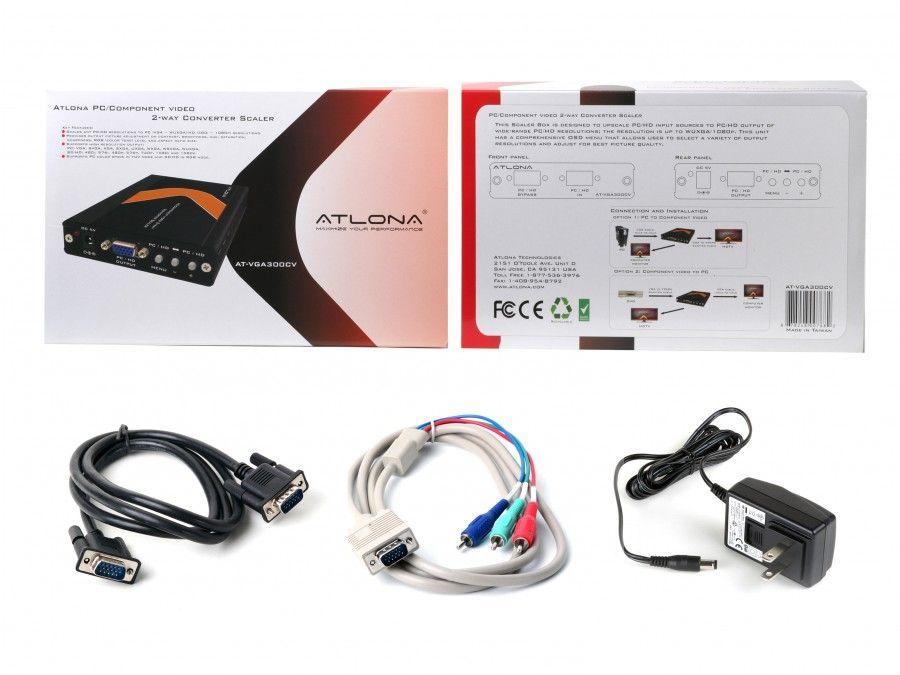
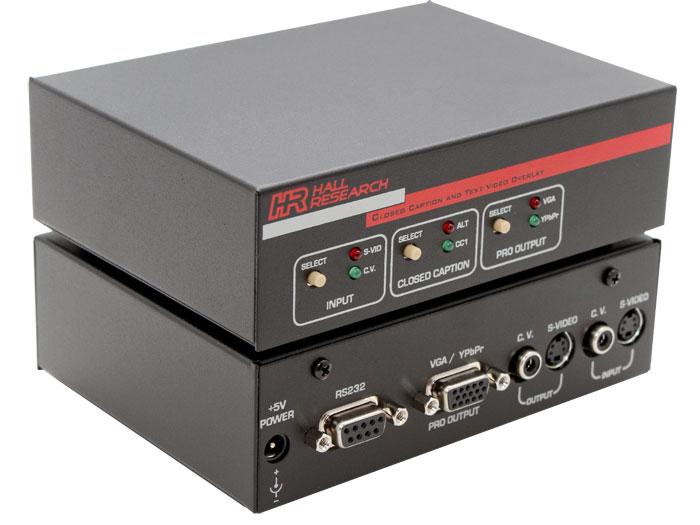
Converters and Scalers bridge the gap between different video signal formats and resolutions. A converter changes one signal type into another (HDMI to VGA, SDI to HDMI, DisplayPort to HDMI, composite to digital, etc.). A scaler changes the resolution of a signal (1080p input scaled up to 4K output, or 4K input scaled down to 1080p) without changing its format. Many devices combine both functions: they convert format and scale resolution at the same time, which is essential in mixed-generation AV installations.
Modern AV installations almost always include equipment from multiple generations and formats. A current laptop has USB-C output; the boardroom display has HDMI input; the existing projector still uses VGA; the older video conferencing system has component inputs; the broadcast trucks use SDI. Without converters and scalers, none of these would talk to each other. With them, signals flow smoothly across formats and resolutions.
Format conversion changes the signal type without changing resolution: HDMI 1080p to VGA 1080p, or SDI 1080p to HDMI 1080p. The receiving display sees the same picture content but on its native interface. Scaling changes the resolution while keeping the format: 1080p HDMI input scaled to 4K HDMI output, or 4K input scaled down to 1080p for an older display. Most installations need both functions, often in the same device.
The most common conversions in commercial AV: HDMI to VGA (modern source to legacy projector); HDMI to DVI (modern source to legacy commercial display); VGA to HDMI (older PC to modern display); SDI to HDMI (broadcast equipment to commercial display); HDMI to SDI (commercial source to broadcast infrastructure); DisplayPort to HDMI (PC source to AV system); composite or component to HDMI (legacy video to modern display); and HDMI to USB capture (live video to streaming or recording software).
Scalers come in many capability levels. Basic scalers upconvert SD to HD or HD to UHD with simple interpolation. Quality scalers use sophisticated algorithms (motion-adaptive de-interlacing, edge-aware upscaling, noise reduction) that significantly improve the picture beyond simple resolution changes. Professional broadcast scalers add color correction, frame-rate conversion (30 fps to 60 fps), and aspect ratio handling. Match the scaler quality to the application: a budget scaler is fine for incidental conversion, but main video paths in broadcast and live events deserve professional-grade scaling.
Scaling and format conversion both add latency: the time between the input signal arriving and the output signal leaving the device. Simple format conversion adds minimal latency (a few milliseconds). Scaling adds more latency depending on the complexity of the processing (typically 1 to 4 frames, or 17 to 67 ms at 60 fps). For most installations this is invisible. For lip sync with audio, gaming, or interactive content, low-latency converters matter.
Converters that include HDMI must manage EDID (the data block that tells sources what the display supports) and HDCP (copy protection). Quality converters include EDID management (presenting a fixed, useful EDID to the source regardless of the display) and full HDCP support at the required versions. Cheap converters often skip these, causing intermittent black screens, resolution surprises, or failure with protected content.
Converters and scalers are used everywhere mixed equipment generations and formats need to coexist: home theaters bridging legacy sources to modern displays, restaurants and bars with displays of varying ages and inputs, hospitals with legacy medical imaging gear connecting to new displays, stadiums with broadcast SDI integrated with commercial HDMI signage, schools with new sources and existing projectors, and any commercial AV installation where modernization happens in stages rather than all at once.
A converter changes the format of a video signal (HDMI to VGA, SDI to HDMI, DisplayPort to DVI, etc.) without changing resolution. A scaler changes the resolution of a video signal (1080p to 4K upconversion, or 4K to 1080p downconversion) without changing format. Many devices combine both functions in one box: they convert format and scale resolution at the same time. In practice, the terms overlap, and product naming is inconsistent. Look at the actual capabilities: what inputs and outputs does the device have, what resolutions does it support on each, and what conversions does it perform?
You need a scaler whenever the source resolution and the display resolution don't match. In an all-4K installation (4K source, 4K display) you don't need a scaler. But mixed installations are common: a 4K display might receive 1080p content from older sources, requiring upscaling; a 4K source might need to feed a 1080p projector, requiring downscaling. Modern AV receivers, displays, and matrix switchers often include built-in scalers; dedicated scalers offer higher quality and more flexibility. For mixed-resolution installations where picture quality matters, a quality scaler is worth the investment.
Yes, both add some latency. Format conversion alone adds minimal latency, typically a few milliseconds. Scaling adds more, usually 1 to 4 frames (17 to 67 ms at 60 fps), depending on the complexity of the scaling algorithm. For most installations the added latency is invisible to viewers. For lip sync with audio (especially when audio takes a different path through the system), for gaming, or for interactive content, low-latency converters and scalers are worth specifying. Some specialty scalers advertise sub-frame latency for these applications.
Up to a point. A quality scaler can clean up a low-resolution source, smooth out interlacing artifacts, reduce noise, and present the image at the display's native resolution without the soft, blurry look that comes from the display's built-in scaling. But scaling cannot add detail that was never there: an SD source upscaled to 4K is still SD detail, just displayed at 4K resolution. The improvement is in presentation, not in true resolution. For preserving the look of legacy content (old video, archival material) at modern resolutions, a quality scaler with motion-adaptive de-interlacing makes a noticeable difference.
Quality converters do; cheap converters often do not. HDCP is the copy-protection handshake between source and display, required for content from Blu-ray, streaming services, and many corporate sources. If a converter does not support the right HDCP version, protected content shows as a black screen or "non-compliant" error. For modern 4K HDR content, HDCP 2.2 or 2.3 is required throughout the chain. Always verify the converter's HDCP support before deploying; some manufacturers explicitly avoid HDCP, others support up to HDCP 1.4 only.
Anywhere mixed equipment generations or formats need to coexist: home theaters bridging legacy DVD or component sources to modern HDMI receivers and 4K displays, restaurants and bars with displays of varying ages and inputs, hospitals with legacy medical imaging gear connecting to new displays, stadiums with broadcast SDI integrated with commercial HDMI signage, schools and universities with new HDMI sources and existing VGA projectors, conference rooms where visitor laptops with different output formats need to drive the room display, and any commercial AV installation where modernization happens in stages rather than as a complete refresh.

On order over $300 and more for US and US territory

We Offer a 30-Day Money Back Guarantee

Full manufacturer's warranty and quality assurance

Safe checkout with trusted payment providers